

Google Maps SEO for clinics isn’t optional anymore. Google’s local pack captures 44% of all healthcare search clicks. The first Google page attracts over 70% of patients when they choose clinics. What makes this critical: 78% of healthcare searches on mobile devices include location intent, and 62% result in same-day or next-day appointment requests. People who search for something nearby visit a related business within 24 hours 76% of the time. This piece walks you through optimizing your Google Business Profile for clinics and implementing healthcare local search strategies that bring real patient appointments.
Key Takeaways
Google Maps dominates healthcare search, with 44% of clicks going to the local pack and 76% of nearby searchers visiting businesses within 24 hours, making Maps optimization essential for patient acquisition.
- Complete your Google Business Profile with accurate NAP details, specific categories, and appointment booking integration to maximize visibility in local searches.
- Generate consistent patient reviews (aim for 50+) and respond within 24-48 hours while maintaining HIPAA compliance to boost trust and rankings.
- Maintain NAP consistency across all 100+ online directories and citations, as 80% of consumers distrust businesses with inconsistent contact information.
- Optimize your website for mobile users (80% of patients search on phones) with sub-3-second load times and implement local schema markup for enhanced search visibility.
- Post weekly Google updates, track local keyword rankings by neighborhood, and monitor competitor positions to maintain your competitive edge in healthcare local search.
Understanding Google Maps SEO for Healthcare
What is Google Maps SEO
Google Maps SEO refers to optimizing your clinic’s online presence to appear at the top when patients search for healthcare services in your area. Someone searches for “pediatrician near me” or “urgent care in [city].” Google displays a map with three business listings at the top, known as the Map Pack or Local Pack. These three positions capture most clicks and can increase patient calls by 50% or more.
Google Maps functions as the modern phonebook for clinics. Your Google Business Profile acts as your practice’s homepage on Google and controls how your facility appears in local search results. Studies show that 46% of all Google searches include local intent. Healthcare tells a more compelling story: 77% of patients use search engines before booking an appointment. This makes Google Maps one of your highest-converting patient acquisition channels. Your practice appears in front of people at their exact moment of need.
How Google Ranks Clinics on Maps
Google evaluates clinic rankings through a combination of signals that determine which practices appear in the Map Pack. Your profile’s completeness serves as the foundation. Businesses with complete and accurate information show up more frequently in local search results. Missing details like your address, phone number, operating hours or services can prevent your profile from appearing in relevant searches in your area.
Categories function as one of the strongest ranking signals. Your primary category tells Google what type of medical practice you operate. Selecting “Family Practice Physician” versus “Urgent Care Center” directly influences which searches trigger your listing. Secondary categories expand your visibility across related searches. Reviews substantially affect where you rank. Practices with 50+ reviews rank higher than those with fewer. Beyond quantity, your star rating matters. You want 4.5 stars or higher. Recent reviews carry more weight than older feedback. Your response rate affects ranking performance.
The Three Ranking Factors That Matter Most
Google uses three major factors when determining local rankings: relevance, distance and prominence. Understanding these helps you focus optimization efforts where they produce actual results.
- Relevance measures how well your clinic profile matches what patients search for. Someone looks for “skin specialist.” Google analyzes your category, services list and profile description to determine if you’re a strong match. Optimized content and keywords on your Google Business Profile directly improve your relevance score.
- Distance refers to how close your clinic sits to the patient’s location. Google uses what it knows about where they are if a patient doesn’t share their location. You cannot change your physical location, but accurate location data will give Google the right information to place your clinic correctly on the map.
- Prominence reflects how credible your practice appears online. This factor takes into account patient reviews, how many websites link to your practice, profile engagement and your overall online reputation. Prominence is where your effort pays off most. You can directly improve it through consistent optimization work.
- Foundation: Google Business Profile Setup for Clinics
Setting up your Google Business Profile correctly determines whether patients find your clinic or scroll past to competitors. Your profile serves as the control center for how your practice appears on Google Search and Maps.
Complete Profile Optimization Checklist
Start with your NAP details: Name, Address, and Phone number. These three elements must match exactly on your Google Business Profile, website, social media, and all online directories. Even minor differences like “St.” versus “Street” can hurt your healthcare local search rankings. Use a local phone number instead of a central call center helpline whenever possible. Your business name should match what appears on your storefront, invoices, and official documents. Avoid adding keywords or city names to your practice name. Google may flag your listing for spam.
Your business description allows 750 characters to explain what your clinic does, who you serve, and what makes you different. Focus on services offered and patient care approach. To name just one example, a family practice might write: “We provide patient-focused healthcare services if you have a family. Our clinic offers easy appointment booking, care tailored to each patient, and modern medical facilities.” Include relevant keywords naturally without stuffing. Operating hours require accuracy, especially when you have a healthcare practice where many searches are time-sensitive and urgent. List your regular hours and special hours for holidays. If you run an urgent care center open late, make those extended hours visible. Update hours promptly when they change to prevent patient frustration.
Selecting Primary and Secondary Categories
Your primary category carries the most weight in determining which searches trigger your listing. Choose the most specific category that matches your core service. Instead of selecting “Doctor,” choose “Pediatrician,” “Dermatologist,” or “Family Practice Physician.” Specific categories help you rank for high-intent searches like “skin specialist near me” or “child doctor in [city].”
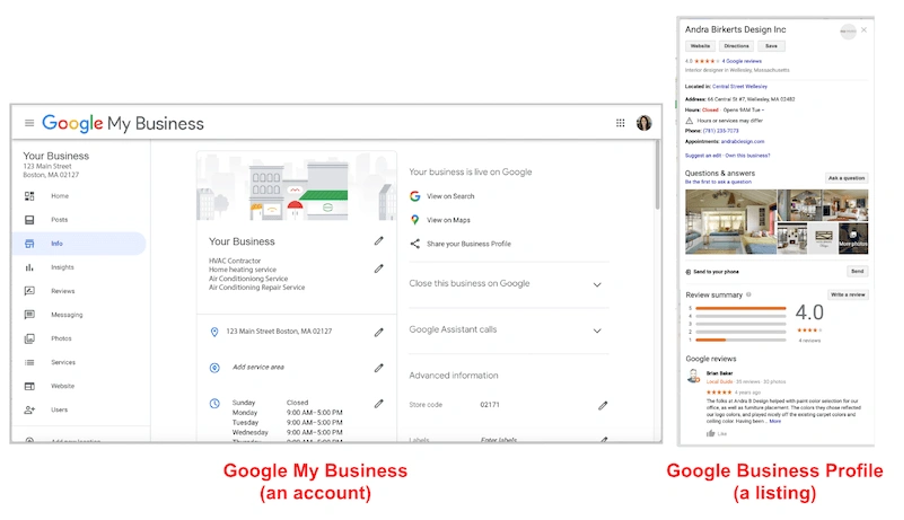
Add secondary categories only for services you genuinely provide. Limit these to two relevant options. A dental clinic might use “Dental Clinic” as primary, then add “Cosmetic Dentist” or “Emergency Dental Service” as secondary categories. Adding irrelevant categories can trigger Google quality raters to flag your profile and potentially result in suspension.
Adding Services and Attributes
The Services section lets you list every treatment you provide. Google offers predefined services for many healthcare categories, and you can add custom services as free-form items. A dermatology clinic might list “Acne Treatment,” “Laser Hair Removal,” and “Pigmentation Treatment.” Each service can include a description up to 1,000 characters. Use keywords patients actually search for, like “same-day appointment” or “accepts new patients.” Attributes appear as small statements that help patients identify what your clinic offers. These include accessibility features like “Wheelchair Available” and service options like “Accepts New Patients.” Add all applicable attributes to broaden your reach in relevant searches.
Appointment Booking Integration
Patients expect instant booking capabilities. Adding appointment functionality to your Google Business Profile reduces friction and increases conversions. Reserve with Google allows patients to book directly from your profile through a blue “Book online” button. This feature is available to healthcare facilities like clinics, hospitals, and dentists.
To activate Reserve with Google, you need a third-party scheduling provider that integrates with Google. Popular options include Practo and Square Appointments. Click the Bookings section in your profile, select your provider, and follow the connection process. Your booking button typically appears within one week. If Reserve with Google isn’t available, you can manually add your own booking link in the Appointments field and direct patients to your website’s scheduling page.
Building Trust Through Reviews and Reputation
Reviews function as the main trust signal for clinics competing in local search. Research shows that 74% of patients read online reviews before selecting a new healthcare provider. More telling, 82% of patients use online reviews when evaluating physicians, and 72% use them as their first step in finding a new doctor. Your review strategy directly influences whether patients choose your clinic or continue scrolling.
Systematic Review Request Process
The optimal time to request a review is right after a positive patient experience. Send automated follow-up emails or texts within 24 hours of the appointment while the care experience remains fresh. Patients respond better to review requests during mid-week, with an 8 to 10 percent increase in response rates. Morning requests also outperform afternoon asks by 5 percent. Your request should have a direct link to your Google Business Profile review section and eliminate any friction in the process. When 60% of patients read at least five reviews when researching providers, consistent review generation becomes critical for maintaining competitive visibility.
Review Response Best Practices
Respond to every review within 24 to 48 hours. Quick responses demonstrate that you value patient feedback and keep your online presence active. Start positive review responses with genuine thanks. Keep the reply brief and personal. Maintain strict HIPAA compliance in all responses by avoiding any confirmation that the reviewer is a patient, any treatment details, dates, conditions, or information that identifies them. A safe response framework has thanking the reviewer for feedback, acknowledging their experience broadly, and offering to continue the conversation offline with direct contact information. Your responses strengthen your healthcare local search presence when you include location-based or service-based keywords.
Managing Negative Feedback
Acknowledge the concern without defensiveness when negative reviews appear. Avoid phrases like “We’re sorry you feel that way,” which distance your practice from the issue. Recognize that the experience didn’t meet expectations and express your commitment to improvement. A compliant response might state: “We appreciate you sharing your feedback. Providing a positive patient experience is important to us. Please contact our office at [phone number] to discuss this further”. Studies show that 36% of patients will overlook a bad review if it receives a careful, thoughtful response.
Using Reviews for Doctor Google Maps Ranking
Reviews directly impact your clinic’s prominence score, one of Google’s three ranking factors. The number of reviews, star ratings, review recency, and your response rate all influence where you appear in local search results. Moving from a 3.5 to 4.2-star average makes your clinic appear substantially more trustworthy and increases appointment bookings. Google favors businesses that receive new reviews on a regular basis and views frequent review activity as evidence that your clinic remains active and continues delivering value.
Technical Optimization for Healthcare Local Search
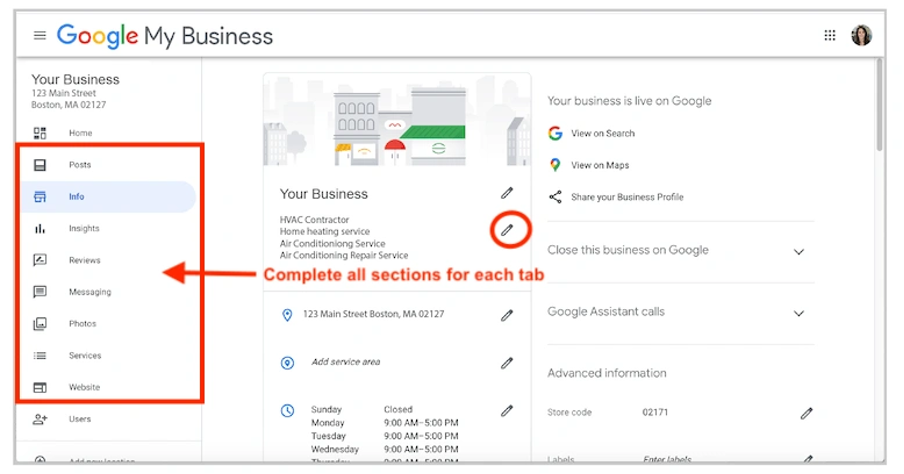
Technical optimization builds the strong foundation that supports your Google Maps SEO for clinics beyond your Business Profile. These backend elements determine whether search engines trust your practice information and how patients experience your digital presence.
NAP Consistency on All Platforms
Your Name, Address, and Phone number must match on every platform where your clinic appears online. Research shows that 41% of businesses display inconsistent listings, and this harms local search rankings. Search engines use NAP data to verify your practice legitimacy. Inconsistencies signal unreliability. Studies indicate that 80% of consumers distrust businesses with inconsistent contact details online. Use similar formatting everywhere. If your address reads “2300 Main Street” on your website, write it that way on directories, not “2300 Main St.” or variations. Phone number format matters too. Choose (555) 123-4567 or 555-123-4567 and maintain that format.
Healthcare Directory Citations
Citations are online mentions of your clinic’s NAP on directories, websites, and platforms. List your practice on healthcare-specific directories like Healthgrades, Vitals, Practo, Lybrate, and JustDial. Also include general directories such as Yelp and local Chamber of Commerce sites. The average medical practice maintains 101 citations. Accuracy determines citation value beyond quantity. Audit existing listings to correct outdated information, remove duplicate listings, and update changes.
Website Mobile Optimization
Mobile optimization affects healthcare local search performance. Over 80% of patients search to find doctors on their phones, and 72% search online to book appointments or get health information. Google prioritizes mobile-friendly sites in rankings through mobile-first indexing. Page speed proves critical as 53% of mobile users abandon sites that take over three seconds to load. Compress images, enable caching, and use quality hosting to achieve load times under three seconds. Responsive design makes your site adapt to all screen sizes.
Local Schema Implementation
Schema markup provides search engines with structured data about your practice. Use LocalBusiness or MedicalOrganization schema types to highlight contact details, operating hours, location, specialties, and reviews. Healthcare-specific schema from Schema.org‘s Health and Life Sciences extension has types like Physician and MedicalClinic.
Implement schema through JSON-LD format using Google’s Structured Data Markup Helper Tool. Proper schema increases chances of appearing in Google’s Knowledge Graph and rich results.
Creating Neighborhood Service Pages
Build dedicated pages for each service that targets specific neighborhoods you serve. A page titled “Pediatric Care in [Neighborhood]” ranks better than generic service pages. Each page should have the service description, local keywords, embedded Google Map, unique content, NAP details, and local testimonials. Want your clinic to appear when patients search nearby? Get a healthcare local SEO strategy from ASK Network.
Ongoing Optimization and Performance Tracking
Local SEO for clinics requires continuous attention beyond the original setup. Performance metrics reveal what drives patient appointments and where adjustments produce results.
Weekly Content Updates Through Google Posts
Google Posts expire after seven days. This requires consistent publishing schedules. Post one to two times weekly and cover service emphasis, physician introductions, health tips, seasonal reminders, and availability updates. Posts appear in search results and Google Maps. They influence patient perception and search algorithms. Regular updates signal active management to Google and support higher local search visibility. Include professional images, patient-friendly language, and clear calls to action like “Book Appointment” or “Call Now”.
Monitoring Local Keyword Rankings
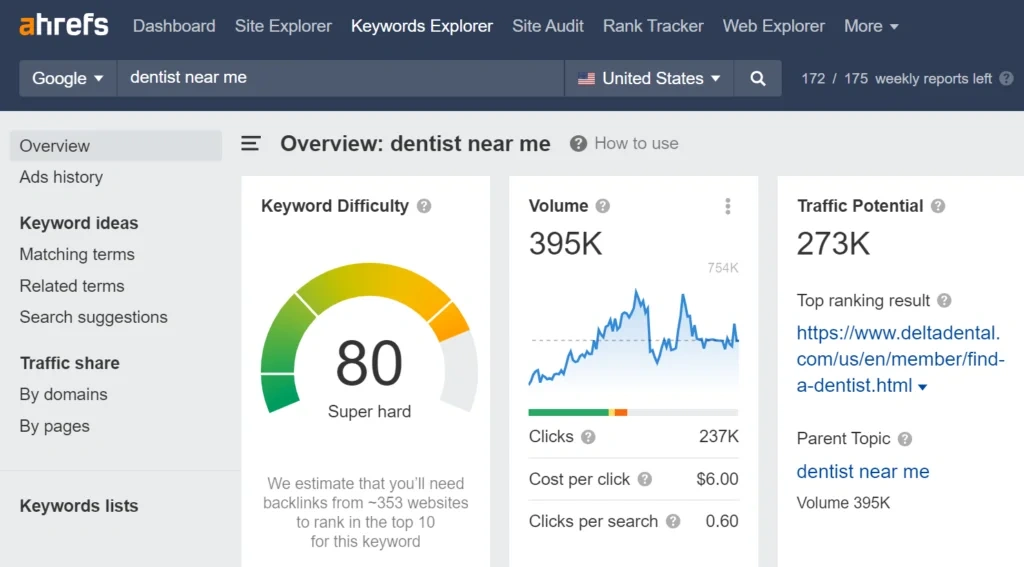
Your clinic’s position for searches like “clinic near me” or specialty-specific queries needs tracking. Use tools like Semrush’s Map Rank Tracker or local rank monitoring services. Rankings shift in different neighborhoods and require location-specific tracking. Alerts when positions change by a lot allow quick responses to ranking drops.
Analyzing Patient Acquisition Sources
Google Business Profile Insights shows views, clicks, calls, directions, website clicks, and bookings. UTM codes added to your website button track referral traffic and conversions in Google Analytics. You can see which digital channels generate appointments, assess cost per lead, and review booking conversion rates.
Competitive Position Tracking
Competitor rankings for your priority keywords need monitoring. Their review velocity, profile activity, and map pack positions help identify gaps in your strategy.
Conclusion
Google Maps SEO for clinics requires consistent effort on multiple fronts. Your success depends on complete profile optimization, active review management, technical accuracy and ongoing performance tracking. These elements work together to improve your prominence, relevance and distance signals that Google uses for local rankings. The time investment pays off. Patients searching for healthcare services nearby convert at exceptional rates. Three-quarters visit within 24 hours. Want your clinic to appear when patients search nearby? Get a healthcare local SEO strategy from ASK Network. Start implementing these strategies today. Focus on profile completeness and review generation first, then expand to technical optimization and competitive tracking. Your Google Maps visibility will strengthen and bring more qualified patients to your practice.
FAQs
Q1. How does Google Maps SEO help clinics attract more patients? Google Maps SEO helps clinics appear in the top three local search results (Map Pack) when patients search for healthcare services nearby. Since 76% of people who search for something nearby visit a related business within 24 hours, and 78% of healthcare searches on mobile include location intent, optimizing your Google Business Profile significantly increases your visibility to patients actively seeking medical care in your area.
Q2. What are the most important ranking factors for clinics on Google Maps? Google uses three primary factors to rank clinics: relevance (how well your profile matches patient searches), distance (how close your clinic is to the searcher’s location), and prominence (your online reputation including reviews, star ratings, and overall credibility). Among these, prominence offers the most opportunity for improvement through consistent optimization efforts.
Q3. How many reviews does a clinic need to rank well on Google Maps? Clinics with 50 or more reviews rank considerably higher than those with fewer. Beyond quantity, maintaining a star rating of 4.5 or higher is crucial. Recent reviews carry more weight than older ones, and your response rate to reviews also affects your ranking performance. Consistency in generating new reviews signals to Google that your clinic remains active and continues delivering value.
Q4. What is NAP consistency and why does it matter for healthcare local search? NAP stands for Name, Address, and Phone number. These details must match exactly across your Google Business Profile, website, social media, and all online directories. Even minor differences like “St.” versus “Street” can negatively affect your local search rankings. Studies show that 80% of consumers distrust businesses with inconsistent contact details online, making NAP consistency critical for both search rankings and patient trust.
Q5. How often should clinics update their Google Business Profile? Clinics should publish Google Posts one to two times weekly, as these posts expire after seven days. Regular updates covering service highlights, health tips, physician introductions, and availability changes signal active management to Google and support higher local search visibility. Additionally, respond to all reviews within 24-48 hours and update operating hours, services, and other profile information promptly whenever changes occur.