


Your website might need a Content Pruning Strategy if it’s battling the zombie apocalypse that plagues most online businesses today. A revealing Ahrefs study analysed over 14 billion pages and discovered that 96.55% of web pages receive zero organic traffic from Google. Experts label these non-performing pages as “zombie content” – excess pages indexed in search engines that add no value to users. Zombie pages can severely impact your website’s performance. Picture this: your website has 1,000 meaningful pages but search engines show 1,500 indexed pages. Those extra 500 pages are likely zombies quietly sabotaging your SEO efforts. Your website’s overall content quality matters to Google. When you have hundreds or thousands of pages, removing zero-traffic content becomes crucial to maintain search visibility.
Content pruning negligence can undermine your content creation investments. Research shows that organic traffic can surge by 106% when old blog posts get updates with fresh content and images. Companies with quality content schedules see 3.5 times more traffic and attract 4.5 times more leads compared to those publishing minimal content. This case study will show you a detailed SEO Content Audit process. You’ll learn how proper Crawl Budget Optimisation through content pruning revolutionised organic performance and helped fix Keyword Cannibalisation issues that lurked beneath the surface.

What is Zombie Content and Why It Matters
Zombie content includes extra pages that search engines index but give users no real value. These pages stay on your website without serving any purpose – just like zombies, they take up space. They can hurt your search engine optimisation efforts. A site-specific search query (like site:yourwebsite.com) reveals zombie pages when indexed pages outnumber your website’s valuable content. Let’s say your website has 1,000 meaningful pages, but search engines show 1,500 indexed pages. Those extra 500 are likely zombie pages. You’ll find these pages everywhere. They could be old blog posts with outdated info, product pages of items you no longer sell, pages about past events, or old landing pages from previous campaigns. It also shows up as auto-generated tag pages, search result pages, and leftover pages from development that nobody removed.
How is it different from low-performing content?
Low-performing content might not get much traffic, but zombie content does real damage to your website. The main difference? Zombie pages get almost no human visitors, yet they still consume your crawl budget resources. These pages go beyond just underperforming. They serve no purpose and bring zero value with their very low visit rates. Experts call this problem ‘low-ranking loops’ users avoid these pages, which makes search engines ignore them even more.
Why it’s a hidden threat to SEO
Your SEO strategy takes several hits from zombie content. These pages water down your website’s quality score and make crawling less efficient. Search engine crawlers see these numerous zombie pages as signs that your website lacks fresh, relevant content. Bad performance metrics come next, with higher bounce rates and people spending less time on your site. Zombie pages might still show up in search results, but they fail to give users what they want. This creates a bad impression of your brand. The worst part? These redundant pages can drag down your quality content over time. Google likes websites that give users valuable content. By wasting resources on useless pages, zombie content ruins your entire SEO strategy.
How to Identify Zombie Pages on Your Website
Your website needs a systematic approach, not guesswork, to spot zombie pages. The right tools and techniques will help you find these performance-draining pages quickly. Stop guessing. Start pruning.
Using Google Analytics and Search Console
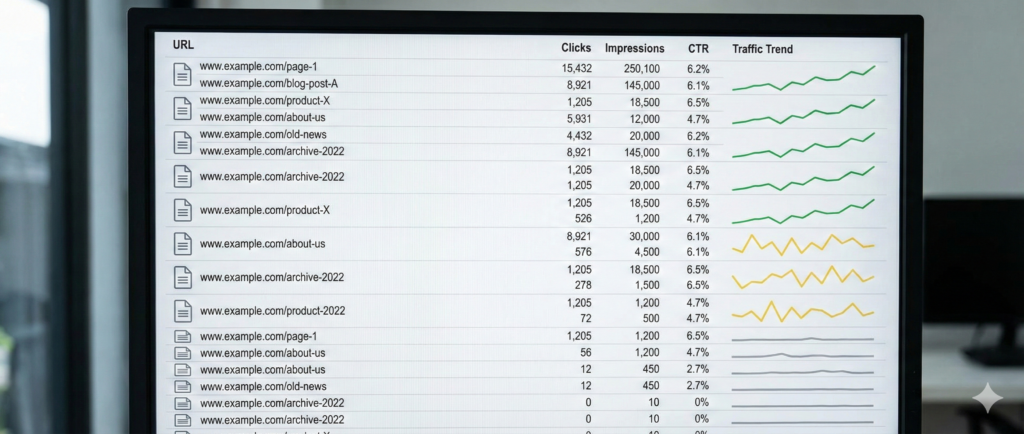
Google Analytics’ ‘Behaviour’ tab holds valuable insights. Select ‘Site Content’, then ‘All Pages’. The ‘Pageviews’ column reveals pages with little to no traffic in the last 3-6 months. Search Console’s Performance report shows pages without clicks or impressions. These neglected pages should be first on your content pruning list.
Signs of content decay
Your organic traffic numbers tell a story. Look for pages with rising bounce rates and shorter visitor sessions. Algorithm updates often expose weak content. Pages that once ranked in top positions but now struggle beyond position 15 need attention. A six-month comparison helps you spot decay patterns early.
Common types of zombie pages
Zombie pages come in many forms. They show up as thin content (under 300 words), outdated blog posts, expired promotions, duplicate content, auto-generated tag pages, and orphaned pages without internal links. Search engines often reject pages that drain server resources.
Fix keyword cannibalisation issues.
Your site suffers when multiple pages target similar search terms. This confuses search engines. A quick site:yourdomain.com “keyword” search reveals competing URLs. Google Search Console data shows which pages compete for the same queries. Clear keyword targeting through content pruning strengthens your site’s relevance.
The Content Pruning Process: A Step-by-Step Case Study
Your site’s organic performance can improve a lot when you identify and remove zombie content systematically. Our case study shows how a website’s SEO results changed through methodical content pruning. Click here to claim your complimentary ‘Index Bloat Audit‘— limited to the first 3 asks this month.
Original SEO content audit and data collection
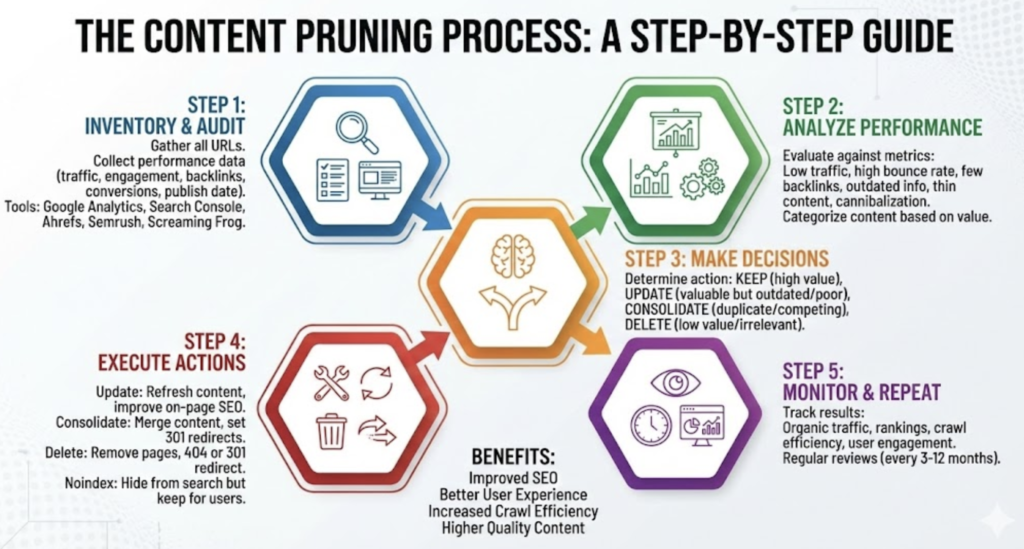
We needed a complete picture of the site data through multiple tools. A complete site crawl using Screaming Frog helped us extract all URLs. Here are the key metrics we collected:
- Organic traffic from Google Analytics (previous 12 months to account for seasonality)
- Impressions, clicks and click-through rates from Search Console
- Backlink data to identify valuable link equity
- Bounce rates and conversion metrics
We didn’t just look at 90 days of data, since this would miss seasonal content patterns. The full year of performance metrics gave us accurate baselines.
Evaluating content performance and relevance
Business goals helped us set clear performance thresholds. We scored pages on four aspects: traffic performance, topical relevance, content quality, and strategic value. Each aspect got a numerical rating (1-5) to help us prioritise action. Pages with deep impressions but low clicks pointed to potential keyword cannibalisation issues. Yes, it is worth noting that pages with impressions exceeding 5,000 but poor click-through rates below industry measures needed attention.
Deciding to delete, merge, or update
Our thorough evaluation led us to group underperforming pages by specific actions. Pages with valuable information but poor performance needed complete updates. We marked pages competing for similar search terms for consolidation. Pages with zero daily clicks and minimal user involvement were removed entirely. Our framework used five possible actions: prune, update, check, improve, or keep, each with specific criteria. This organised approach stopped us from making quick decisions that could hurt SEO equity.
Redirects and internal link updates
The technical details needed careful attention. We set up proper 301 redirects to relevant alternative content for deleted pages with backlinks. Every redirect pointed to genuinely related content instead of generic pages. We then fixed all internal links that pointed to pruned pages. This prevented redirect chains that waste crawl budget. Our complete approach removed problematic content while preserving link equity – a vital balance in successful content pruning.
Crawl budget optimisation through pruning.
Our results showed significant improvements in crawl efficiency. Search engines could focus on valuable content after we removed unnecessary URLs. Getting rid of duplicate content also eliminated crawl waste on pages serving the same purpose. Larger sites with frequently changing content benefit the most from crawl budget optimisation. Yet, systematic pruning helps all sites send better content quality signals to search engines. The whole process ended up improving organic traffic and rankings across the remaining optimised pages.
Results and Lessons Learned from the Case Study
Our Content Pruning Strategy implementation delivered exceptional results across multiple metrics. The measurable improvements and key takeaways emerged naturally from this systematic approach.
Increase in organic leads and traffic.
The websites showed remarkable growth in key performance indicators after we implemented content pruning. Organic traffic increased between 30-150% in a variety of case studies. One soaring win came from pruning approximately 3,000 pages (roughly 15% of the site). The organic traffic jumped by 50%, and we managed to keep this improvement steady. Another case study revealed equally impressive numbers with a 104% increase in organic sessions and a 102% rise in transactions.
Improved crawl efficiency and rankings
The benefits went beyond traffic improvements. Search engines could focus their crawl resources on valuable content because unnecessary URLs were gone. Pages ranked higher for relevant keywords as search engines understood the site’s focus and authority better. The proper redirects helped channel link equity to remaining pages, which strengthened the overall domain authority.
What worked and what didn’t
Not all approaches succeeded. Content consolidation into single authoritative assets worked better than removing content without redirection. Some sites lost organic traffic due to excessive pruning. Poor user experience and broken links plagued sites that removed content without proper redirects. The most compelling evidence suggests content pruning works best with content improvements, since pruning alone sometimes showed minimal impact.
How this changed the content strategy
This experience revolutionised content approaches completely. Content pruning became a regular maintenance task instead of a one-time project. Sites adopted regular assessment schedules, every six months for sites under 1,000 pages and quarterly for larger ones. Quality took priority over quantity. Teams focused on detailed coverage of topics rather than creating many thin pages. The priority shifted to updating existing assets over creating new ones, since content freshness significantly affects search algorithms.
Conclusion
Content pruning is a powerful strategy that many websites ignore while struggling with zombie content. The scale of this problem becomes clear when you look at the data nearly 97% of all web pages get zero organic traffic. These non-performing pages hurt your SEO efforts and waste resources. Our case study shows the remarkable results of systematic content pruning. Websites typically see massive growth in organic traffic between 30-150% after detailed auditing and strategic pruning. Search engines reward this quality-focused approach with better crawl efficiency and higher rankings for valuable pages.
The process needs methodical analysis rather than guesswork. You need performance data from at least 12 months to get a complete picture. This helps you assess content against clear metrics and make smart decisions about which pages to delete, merge, or update. The next step involves setting up proper redirects and updating internal links to preserve valuable link equity while removing problematic content. The most important lesson from this study reveals a radical alteration in content strategy. Content pruning works best as an ongoing maintenance task rather than a one-time project. Successful websites have moved away from focusing on quantity to quality. The emphasis now lies on detailed coverage of topics instead of many thin pages.
Zombie content quietly drags down your best pages. You can eliminate this hidden threat by identifying and systematically pruning content. This optimises your crawl budget and improves organic performance dramatically. The evidence shows that less truly is more – removing underperforming content strengthens what remains. It creates room for growth and better visibility.
Key Takeaways
Discover how eliminating zombie content can transform your website’s SEO performance and dramatically boost organic traffic through strategic content pruning.
- 96.55% of web pages receive zero organic traffic – zombie content silently undermines your SEO efforts by wasting crawl budget and diluting site quality signals.
- Content pruning delivers 30-150% organic traffic increases – systematic removal of underperforming pages allows search engines to focus on your valuable content.
- Use 12-month data for accurate zombie identification – analyse Google Analytics and Search Console to find pages with minimal traffic, high bounce rates, and keyword cannibalisation issues.
- Quality trumps quantity in modern SEO – focus on comprehensive topic coverage rather than numerous thin pages, making content pruning an ongoing maintenance task.
- Proper redirects preserve link equity during pruning – implement 301 redirects to relevant content and update internal links to maintain SEO value whilst removing problematic pages.
The evidence is clear: removing underperforming content strengthens what remains, creating space for improved visibility and sustainable organic growth. Content pruning isn’t just about deletion, it’s about strategic optimisation that transforms your entire SEO performance.
FAQs
Q1. What exactly is zombie content, and why should website owners be concerned about it? Zombie content refers to web pages that provide little or no value to users but remain indexed by search engines. These pages can harm your SEO efforts by diluting your site’s overall quality and wasting crawl budget. Website owners should be concerned because zombie content can negatively impact search rankings and organic traffic.
Q2. How can I identify zombie pages on my website? You can identify zombie pages by using tools like Google Analytics and Search Console. Look for pages with minimal traffic over the past 3-6 months, zero clicks or impressions, high bounce rates, and reduced time-on-page metrics. Also, check for outdated content, thin content pages, and pages competing for the same keywords.
Q3. What are the benefits of implementing a content pruning strategy? Implementing a content pruning strategy can lead to significant improvements in organic traffic (often between 30-150%), improved crawl efficiency, higher rankings for relevant keywords, and better overall domain authority. It helps search engines focus on your valuable content and strengthens your site’s quality signals.
Q4. Should I delete all underperforming pages during content pruning? No, you shouldn’t delete all underperforming pages. The decision to delete, merge, or update should be based on a thorough evaluation of each page’s performance, relevance, quality, and strategic value. Some pages may benefit from updates or consolidation rather than outright deletion.
Q5. How often should I conduct content pruning on my website? Content pruning should be an ongoing maintenance task rather than a one-time project. For websites with under 1,000 pages, it’s recommended to conduct content assessments every six months. Larger websites should consider quarterly assessments. Regular pruning helps maintain site quality and optimises SEO performance.